


Requisition and Purchase Order approval notice viewing
Oracle worklist notices remain for 30 days.
If a requisition (REQ) or a purchase order (PO) change is not approved after 30 days, the notice is removed.
Below steps show how to search for an approval notice
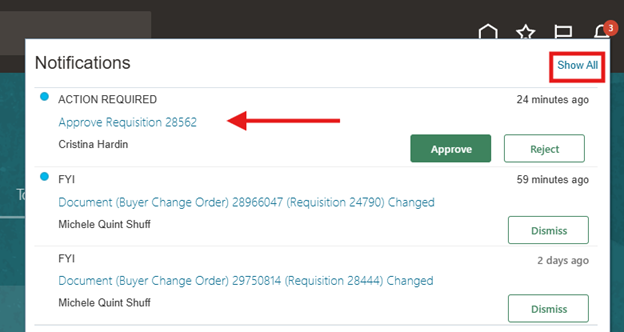
Select the Notification icon (bell) located at the top right of the home page.
The bell icon may or may not have a red indicator with a number on it.

Once the bell icon is selected the below view will populate.
If you have a pending action as indicted by the red arrow, click on the information in blue, this is a hyper link and will move to the approval screen.
If you do not find any notifications, select Show All
From this view, select Worklist.
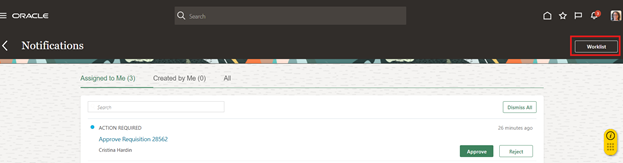
Select the time frame form last 7 days to All, enter the requisition in the Search bar, select the magnifying glass.

Select the relevant requisition link to proceed with review, approval or rejection

Note: if the requisition or purchase order number cannot be located, the approval most likely expired due to 30-day inactivity.
If this occurs, the requisition or purchase order preparer will need to withdraw the REQ or PO change and resubmit.
Review the Requisition approval.
Click the Actions dropdown menu if the additional steps are required To have another person sign in your place, use reassign.
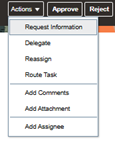
If none of above are required, select Approve or Reject
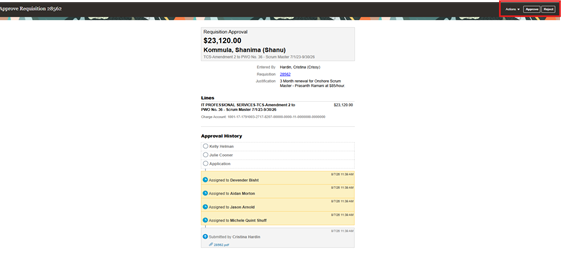
When approve is selected, add a note in Comment box if required, and select Submit.
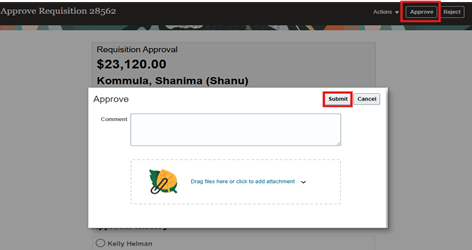
This completes the Approval notice view resubmit requisition or PO change for approval process.
Related knowledge based guide Edit a Requisition Or Purchase Order
See attached word doc to download and save.


